Applies to: SureCartHub mobile app
Viewing subscription details is free – connect your store with a secret API token and open any subscription from the Subscriptions tab. No SureCartHub license is required to browse status, pricing, upcoming billing, past periods, purchases or customer contact info.
Open a subscription
- Tap Subscriptions in the bottom tab bar.
- Search or filter the list if you need to find a specific recurring customer.
- Tap any subscription card to open its detail screen.
You can also open a subscription from a customer profile or when reviewing subscription-type orders.
Status and renewal
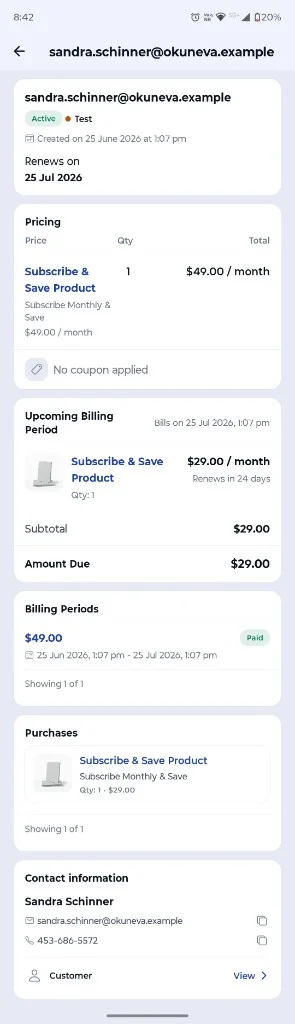
At the top of the screen you see the customer identifier, subscription status and key dates:
- Status badge – active, trialing, past due, canceled and more
- Test badge – when the subscription is from SureCart test mode
- Created date – when the subscription started
- Renews on – next billing date (or trial end / cancel date when applicable)
Pricing, billing and customer
Scroll down for the full recurring picture:
- Pricing – product, price name, quantity, recurring rate and any applied coupon
- Upcoming billing period – what bills next, subtotal, discounts and amount due
- Billing periods – past charges with paid/unpaid status and date ranges; tap Load more for older periods
- Purchases – access grants tied to the subscription
- Contact information – name, email and phone with copy buttons; tap View to open the customer profile
Tip
Need to narrow a long subscription list first? See Filtering orders & subscriptions for search and filter options.

