
Applies to: SureCartHub mobile app
The Dashboard is the first screen after you connect your store. Revenue stats are free to view with your store token – no SureCartHub license required. Pull to refresh anytime for the latest numbers from your SureCart account.
Revenue at a glance
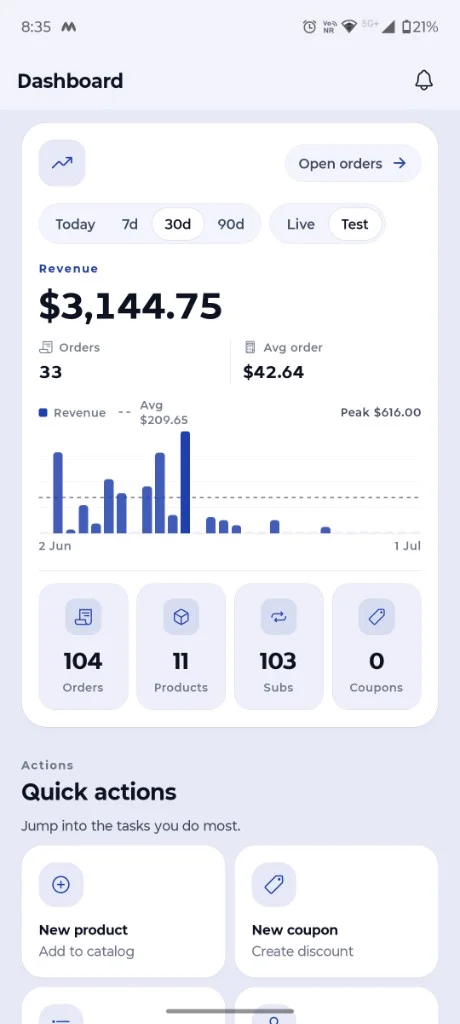
The main card on the Dashboard shows how your store is performing:
- Revenue – total for the selected period
- Orders – checkout count in that period
- Avg order – average order value
- Revenue chart – bar chart with average and peak labels
- Open orders – shortcut to the full Orders list
Change the time range
Tap the period control above the revenue total to switch between Today, 7d, 30d and 90d. Revenue, order count, average order and the chart all update for the range you pick.
Live vs test
Use the Live / Test toggle beside the period control to include only live checkouts or only SureCart test-mode orders. Handy when you are trying purchases in test mode without mixing them into real revenue.
Store counts and quick actions
Below the chart, four tiles show totals for Orders, Products, Subs and Coupons – tap any tile to jump to that section. Further down, Quick actions get you to common tasks like creating a product or coupon.
Tap the bell icon in the header to open your notification inbox for recent store events. For live push alerts on your phone, see Push notifications.
Tip
Tap Open orders on the revenue card to drill into individual checkouts – see Viewing order details.

