Applies to: SureCartHub mobile app
Viewing order details is free – connect your store with a secret API token and open any order from the Orders tab. No SureCartHub license is required to browse payment status, line items, customer info or shipping address. A license is only needed for actions such as fulfillments, revoking access or resending notifications.
Open an order
- Tap Orders in the bottom tab bar.
- Search or filter the list if you need to find a specific checkout.
- Tap any order card to open its detail screen.
You can also jump to an order from a push notification, the dashboard inbox, a customer profile or a linked subscription. For full recurring billing info, see Viewing subscription details.
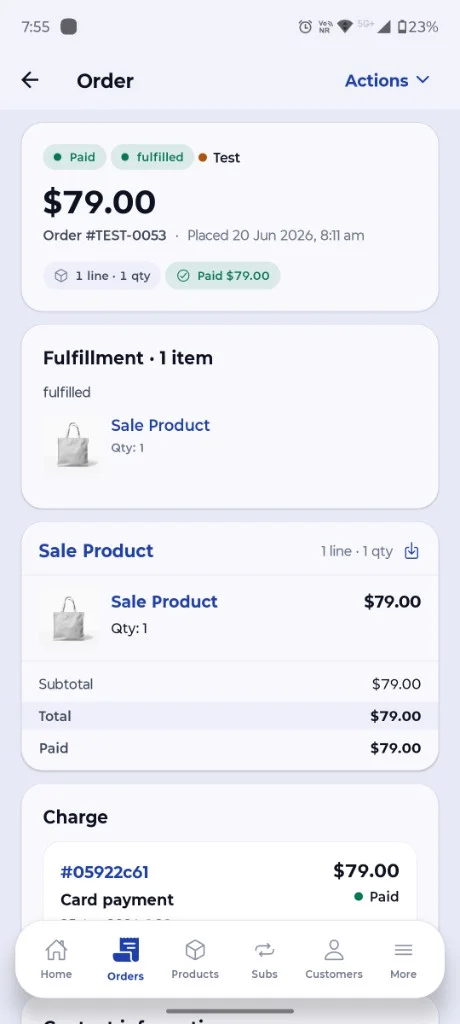
Order summary
At the top of the screen you see the essentials at a glance:
- Payment status – paid, unpaid and more
- Fulfillment status – fulfilled, unfulfilled or partial
- Test badge – when the order is from SureCart test mode
- Total, order number and placed date
- Line items – products, quantities and amounts
- Fulfillment – shipped items when applicable
- Charge – card payment and transaction ID
Customer, address and purchases
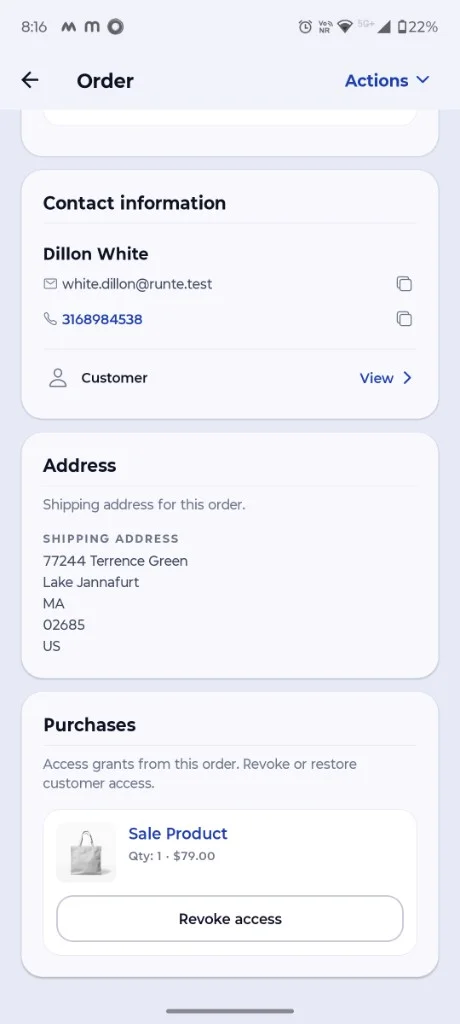
Scroll down for the full picture:
- Contact information – name, email and phone with copy buttons; tap View to open the customer profile
- Shipping address – delivery details for physical orders
- Purchases – access grants from the order; revoke or restore with a license
Actions
Tap Actions in the top-right corner for order-level tasks such as resending notifications or canceling a checkout. Fulfillment and purchase access changes also live here or on their respective cards. These write actions require an activated SureCartHub license.
Tip
Need to narrow a long order list first? See Filtering orders & subscriptions for search and filter options.

