
Open the API settings
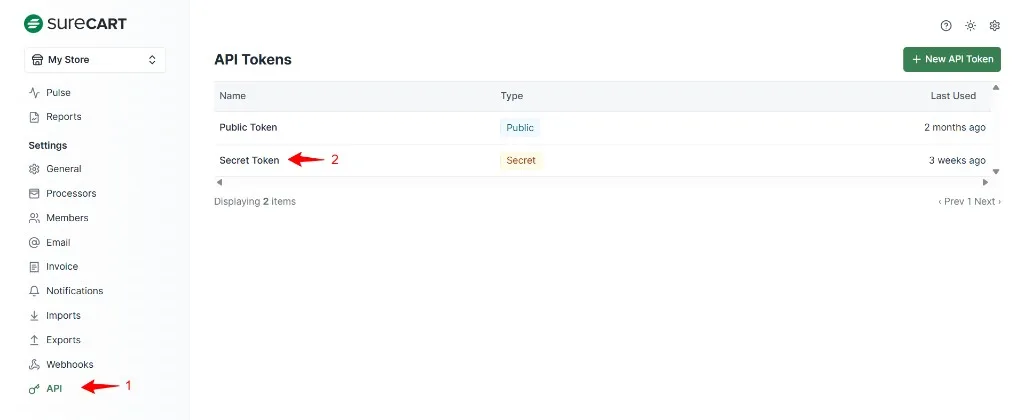
In your SureCart dashboard, go to Settings – API (1). You’ll see a list of API tokens. Click the Secret Token row (2) to open it.
SureCartHub App
Your SureCart Secret Token connects the SureCartHub mobile app to your store. Follow the three steps below to copy it from your SureCart dashboard.
In your SureCart dashboard, go to Settings – API (1). You’ll see a list of API tokens. Click the Secret Token row (2) to open it.
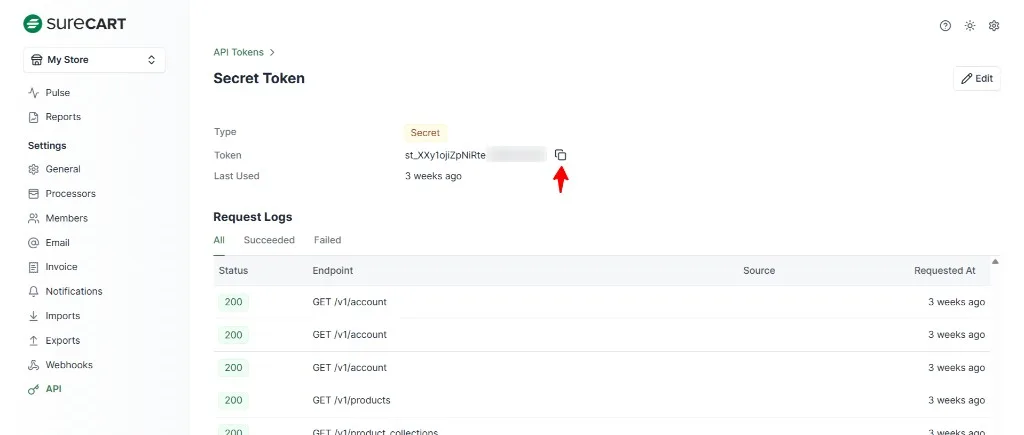
On the Secret Token page, click the copy icon next to the token (it starts with st_). This copies the full token to your clipboard.
Open the SureCartHub app, go to the Connect Store screen, paste your store URL and the Secret Token, then tap Connect. Your store data loads instantly.
See the full setup guide in our documentation, or reach out and we’ll help.

